The business management software market is sitting at $80B and growing, and somehow every “best of” list looks identical. Same eight platforms. Same order. Same lack of context about who those platforms are actually built for. A solo consultant invoicing three clients a month has nothing in common with a 40-person marketing agency managing campaigns across 15 accounts. Giving them the same list is useless.
This guide takes a different approach. Answer three quick questions, figure out which category you’re in, and walk away with a clear answer, not a shortlist of tools you’ll have to evaluate for another six hours. If you want even more depth on picking the right CRM layer for your business, the how to choose a CRM for your industry guide is a solid companion to this one.
The Problem with Generic Listicles
Open any competitor article and you’ll see HubSpot, Monday.com, Zoho, ClickUp, and Salesforce ranked by feature count or G2 rating. Those ratings are averages across millions of users with completely different problems. A five-star review from an enterprise software team tells you nothing about whether the tool fits a two-person consulting shop.
The result is that small business owners buy the most-reviewed platform and end up using 15% of its features. They pay for complexity they don’t need, get overwhelmed during onboarding, and either abandon it or let it become another monthly expense that runs in the background without actually helping.
Matching software to business type eliminates most of that friction before you ever sign up.
Quick Self-Assessment Before You Look at Any Tool
Three questions. Honest answers. This narrows the field faster than any feature comparison.
1. What type of business do you run? Service business, product company, agency managing clients, or consulting/professional services. These have fundamentally different operational needs, and what you’re managing day-to-day looks completely different across these categories.
2. How big is your team? Solo, 2–10, 10–50, or 50+. Per-seat pricing changes the math dramatically at different team sizes, and some platforms are built for flat-rate billing that makes more sense for agencies than per-user tools.
3. What’s your biggest operational bottleneck? Lead generation and nurture, project and task management, client communication and contracts, or invoicing and billing. Most platforms do all of these to some degree, but every platform is optimized for one or two of them, and that’s where the real differentiation lives.
The 8 Business Management Software Platforms Worth Knowing
Not a ranked list. A map of what each platform is actually built to do, with honest pricing.
-
GoHighLevel, $97–$497/mo flat. All-in-one CRM, email, SMS, funnels, booking, and automation on flat pricing with no per-seat fees. Built for agencies and marketing-forward businesses: sub-accounts let you run a separate system for each client without paying per contact. Not the right fit for product companies or teams that need deep project management.
-
Monday.com, $12–$28/user (3-user minimum). Visual work management that doubles as a lightweight CRM. Boards, automations, and project tracking in one place. Best for project-driven agencies and teams where deals turn directly into deliverables.
-
ClickUp, Free to $12/user. Project management, docs, goals, and a decent free tier. The strongest free plan in this category: covers tasks, time tracking, and basic CRM for teams that aren’t ready to pay yet. Great for lean startups and early-stage companies.
-
Zoho One, $37/user (all-employee pricing). 45+ integrated apps (CRM, accounting, HR, marketing, help desk) on a single subscription. The all-employee pricing model means every person on your team gets access, which changes the unit economics for companies at 10+ people.
-
Odoo, $25–$37/user. Modular ERP with CRM, inventory, accounting, and manufacturing in one system. The go-to for product-based and manufacturing businesses that need operations management alongside sales and client management.
-
HubSpot, Free CRM to $100+/seat. Best inbound marketing and CRM in this category. Lead scoring, contact enrichment, marketing automation, and tight marketing-to-sales handoff. The free tier is genuinely useful. The pricing jump to paid tiers is steep but worth it for B2B companies with real inbound volume.
-
Dubsado, $35/mo flat. Client operations built specifically for freelancers and service providers: proposals, contracts, invoices, and scheduling in one flat-rate tool. Flat pricing is the key feature here: you can have unlimited clients without the per-seat math working against you.
-
HoneyBook, $8–$33/mo. Fast setup for solo service providers. AI-powered client management with proposals, payments, and scheduling built in. The quickest onboarding in this category: you can be sending proposals the same afternoon you sign up.
Best Business Management Software by Business Type
This is the section most comparison articles skip entirely. Here’s where each platform actually fits.
Solo Service Providers
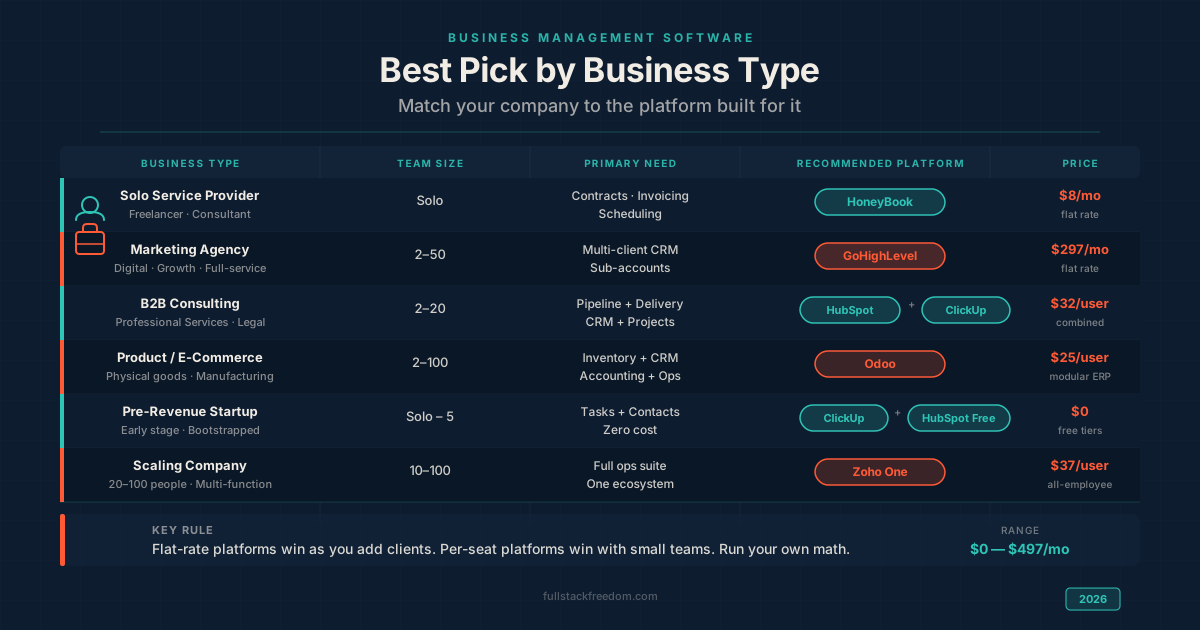
HoneyBook at $8/mo or Dubsado at $35/mo are the two honest answers here. Both handle the full solo service provider workflow: proposals, contracts, invoicing, scheduling, and client communication in one place. HoneyBook’s AI features and fast setup make it the better pick if you want to be running the same day. Dubsado has more workflow customization, better if you have a complex process you need to systematize.
Both have flat pricing, which matters. When you’re solo and revenue is variable, per-seat pricing from bigger platforms is overhead you don’t need.
Marketing and Growth Agencies
GoHighLevel at $297/mo is the default answer for marketing agencies, and not just for the price. The flat Agency plan gives you unlimited client sub-accounts: a separate CRM, pipeline, and automation environment for each client without paying per seat or per contact. White-label capability means you can brand it as your own software and charge clients for access, which changes the business model entirely. If you’re thinking about the economics of that kind of recurring software revenue, the subscription business models breakdown is worth reading alongside this.
Monday.com is worth a look if your agency is project-heavy and you want one tool that handles both sales pipeline and project delivery.
B2B Consulting and Professional Services
HubSpot Starter ($20/seat) paired with ClickUp ($12/user) is the strongest combination here. HubSpot manages the pipeline: deal stages, contact history, follow-up sequences, and inbound lead tracking. ClickUp handles delivery once a deal closes (project tasks, docs, and client work). Two tools that each do one job well tends to outperform one tool that tries to do both adequately.
Pipedrive is a leaner alternative to HubSpot for teams where sales process simplicity matters more than marketing integration.
Product and E-Commerce Companies
Odoo at $25/user is the strongest fit for businesses that sell physical products, manage inventory, or have manufacturing components. The modular ERP approach means you can add CRM, inventory, accounting, purchase orders, and shipping in one system. Most CRM-first platforms treat inventory as an afterthought. Odoo builds the entire operation around it.
For e-commerce without a physical inventory component, HubSpot’s marketing and contact management integrations are strong.
Pre-Revenue Startups
ClickUp Free + HubSpot Free CRM. Zero cost, and together they cover the majority of what an early-stage company actually needs: task management, basic contact tracking, a sales pipeline, and document storage. The free tiers are not stripped-down demos; both are genuinely functional at this level. When you hit the limits, the upgrade paths are clear and the data migrates with you.
Scaling Companies (20–100 People)
Zoho One at $37/user (all-employee) or HubSpot Professional. At 20+ people, you’re managing more complexity than a single-purpose tool can handle well, and the cost of disconnected systems compounds. Zoho One’s all-employee pricing includes CRM, finance, HR, help desk, and 40+ other apps, which starts to look very attractive against buying each of those separately. HubSpot Professional is the better choice if inbound marketing is the primary growth lever and you want the strongest marketing-to-sales alignment available. Check out the best lead management software breakdown for a deeper look at how the CRM options compare at this stage.
All-in-One vs. Best-of-Breed
This is the real strategic question underneath all of the platform comparisons.
When a single platform makes sense: You’re under 10 people, you want one login, one bill, and one system to learn. The overhead of stitching multiple tools together with Zapier or native integrations isn’t worth the marginal improvement in any one function. Most sub-10-person companies should default to all-in-one until they hit a specific bottleneck.
When best-of-breed makes sense: You have a specific function that a specialized tool handles dramatically better than any all-in-one. The classic example is CRM + project management. Tools like HubSpot handle pipeline and contact management better than ClickUp, and ClickUp handles project delivery better than HubSpot. If both functions are genuinely important to your operation, the two-tool stack often outperforms either all-in-one option.
The failure mode is buying a best-of-breed stack too early, before you actually know which functions matter most. Start simple, hit real limits, then specialize.
Pricing Reference
| Platform | Entry | Mid-Tier | Notes |
|---|---|---|---|
| GoHighLevel | $97/mo | $297/mo | Flat rate, no per-seat |
| Monday.com | $12/user | $17/user | 3-user minimum |
| ClickUp | Free | $12/user | Best free tier |
| Zoho One | $37/user | $37/user | All-employee pricing |
| Odoo | $25/user | $37/user | Modular ERP |
| HubSpot | Free CRM | $20/seat | Steep jump to Pro |
| Dubsado | $35/mo | $35/mo | Flat rate, unlimited clients |
| HoneyBook | $8/mo | $33/mo | Fast setup |
The structural thing to notice: flat-rate platforms (GoHighLevel, Dubsado, HoneyBook) have fundamentally different economics than per-user platforms as you scale. At 10 clients, flat-rate wins. At 2 users, per-seat platforms often have lower out-of-pocket cost. Run the math for your actual situation before the pricing page does it for you.
Making the Call
Start with the bottleneck question. If you can name the one thing that actually slows your business down (lead follow-up, project chaos, billing friction, client communication), that single answer usually points directly to the right platform. And if AI adoption is on your radar, here’s how to build an AI strategy that actually works, plus a practical list of generative AI use cases for business to see where the biggest wins are landing right now.
If you’re still working through it, or want the worksheet I use with founders to map business type to the right tool stack, it’s in the Skool community. Free to join. That’s where the templates and decision tools live.