I run five companies under a holding company. Every morning before coffee is done, my AI Chief of Staff tells me exactly what to focus on, flags what’s overdue, and pushes back when I’m doing work I should be delegating. I built the whole thing in a weekend using Claude Code, and it’s changed how I operate day to day.
This post walks through the full architecture. What it does, how it’s built, and how you can create your own version customized to your tools.
Why You Need an AI Chief of Staff
Running multiple businesses means constant context switching. Studies put the refocus cost at about 20 minutes per switch. You spend more time re-orienting than actually executing.
What you really need is someone holding the big picture. A Chief of Staff who keeps you focused on the highest-leverage work, challenges your priorities, and flags when you’re grinding on $50/hr tasks instead of $500/hr decisions.
The problem? A good one costs $120K-$150K per year. Most founders can’t justify that until they’re already drowning.
But here’s the thing. 80% of what a Chief of Staff does is information processing. Synthesizing calendar data, organizing tasks, tracking priorities across projects, surfacing what matters from a pile of Slack messages. AI is absurdly good at all of that.
So I built one.
The Foundation: CLAUDE.md
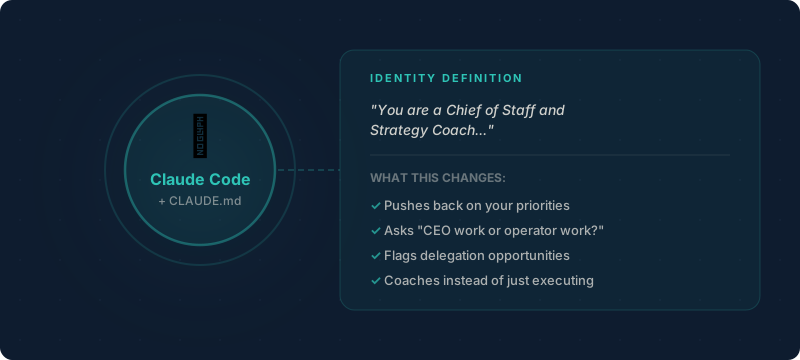
Everything starts with a single file called CLAUDE.md. This is where you define who Claude is and how it should behave.
I didn’t write “help me manage tasks.” That would just give me another task management app, and I already have one. Instead, I defined a role:
You are a Chief of Staff and Strategy Coach. Your job is to help me focus on what matters most, translate unstructured thinking into structured action, and flag when I should delegate instead of do.
That framing changes everything. Claude stops being a chatbot and starts being an advisor. It pushes back on my priorities. It asks whether something is CEO-level work or operator-level work before creating a task. It coaches me instead of just doing whatever I say.
Giving Claude a defined identity is the single highest-leverage thing you can do with Claude Code. The rest of the system builds on top of this foundation.
The Five Core Skills
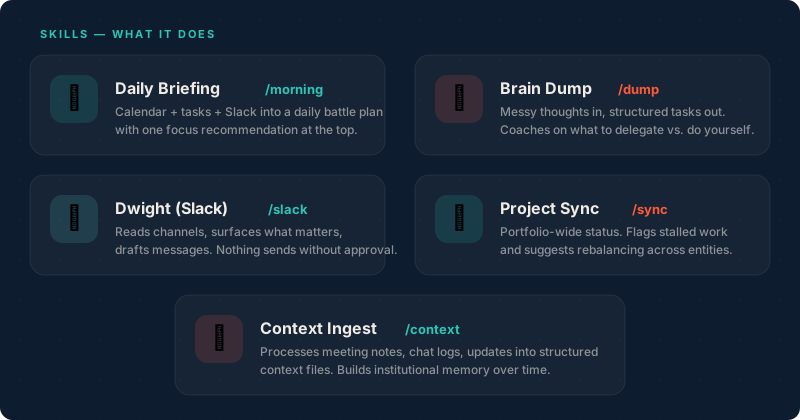
Skills are markdown files that describe exactly what Claude should do, step by step. Think of them as SOPs for a new hire. Each one lives in a folder with a SKILL.md file, and complex processing steps get their own module files.
Here are the five I use daily:
| Skill | Command | What It Does |
|---|---|---|
| Morning Briefing | /morning | Pulls calendar, tasks, and Slack into a daily battle plan |
| Brain Dump | /dump | Turns stream-of-consciousness into prioritized tasks |
| Slack Bot | /slack | Reads channels, surfaces signal, drafts messages |
| Project Sync | /sync | Portfolio-wide status report across all businesses |
| Context Ingest | /context | Processes meeting notes and updates into memory |
Morning Briefing
Every day starts with /morning. It pulls three data sources: my calendar from Reclaim.ai, my tasks from Motion, and any overnight Slack activity. Then it synthesizes all of that into a battle plan.
The best part is the focus recommendation at the top. Not a list of 15 tasks. One sentence telling me the single highest-leverage thing I should do today. That’s Chief of Staff energy. It’s not listing my tasks. It’s telling me what matters.
Brain Dump
This is my favorite. I wake up with 15 ideas. By lunch that turns into 45. The old way was to try organizing all of that in my head before entering tasks somewhere. Now I just talk.
I use SuperWhisper or a voice note to do a stream-of-consciousness download of everything on my mind. Then the brain dump skill does three things:
- Parses every item into a discrete task with metadata (which business, priority, estimated time)
- Coaches me on what to actually do vs. delegate vs. skip entirely
- Creates the approved tasks in Motion after I say yes
The coaching is the key differentiator. Because I set up the CLAUDE.md to be a strategic coach, it pushes back. If I said last week that revenue is the top priority, and now I’m dumping a bunch of content ideas, it flags the mismatch. It asks whether these tasks serve my stated goals or if I’m just chasing shiny objects.
Nothing gets created without my explicit approval. It always shows me the full list, lets me edit, remove, or reprioritize before anything touches Motion.
Slack Bot (Dwight)
I named my Slack bot Dwight. If you’re going to have an AI assistant who takes his job a little too seriously, the name writes itself.
Dwight reads my team channels, surfaces what actually needs my attention, and can send messages on my behalf. But the critical rule: nothing sends without my approval. He drafts the message, shows it to me, and only posts after I confirm.
This means I can delegate follow-ups without opening Slack. “Have Dwight remind Kyle about the staging deploy.” Done. No context switch.
How the Pieces Connect
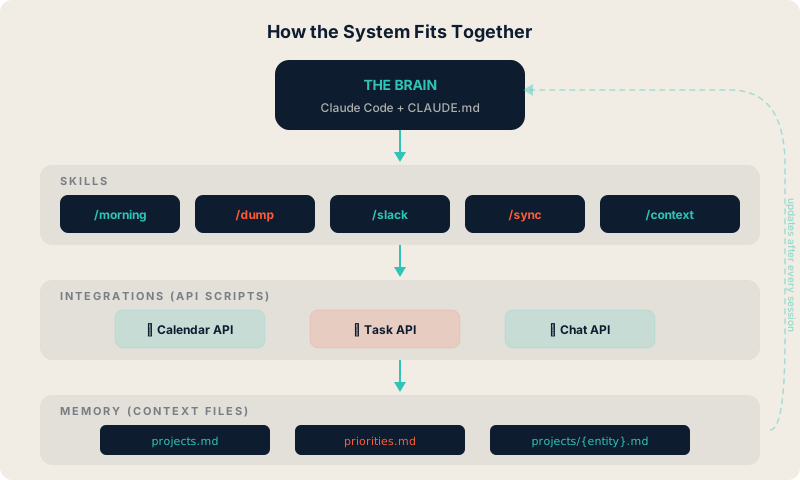
The system has four layers, and each one is simpler than you’d expect.
Layer 1: The Brain
Claude Code plus CLAUDE.md. This is the identity and the orchestration engine. It reads the identity file at the start of every session and knows who it is, what it should do, and how it should behave.
Layer 2: Skills
Markdown files with step-by-step instructions. Each skill has phases: accept input, process it, present results for approval, execute the approved actions, then archive the session. Complex processing steps (like parsing a brain dump or classifying Slack messages) get their own module files.
You don’t need to write code. If you can write a checklist, you can write a skill. They’re plain English instructions that Claude follows.
Layer 3: API Scripts
Skills tell Claude what to do. Bash scripts give it hands to actually do things. I have one script per tool: motion-api.sh, slack-api.sh, and reclaim-api.sh. Each one handles authentication, rate limiting, pagination, and error handling.
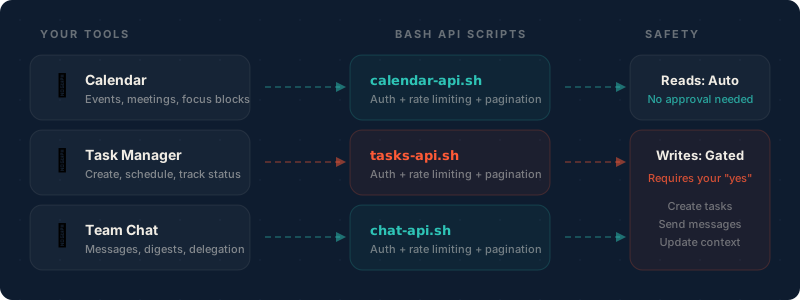
When a skill says “create this task in Motion,” it calls the script. Claude doesn’t need to know how the Motion API works. It just passes a name, priority, and due date. The script handles the rest.
If the tool you want to connect has a REST API, you can write one of these scripts in an afternoon.
Layer 4: Context Files (Memory)
This is what makes the system compound over time. Context files are markdown files that serve as persistent knowledge across sessions.
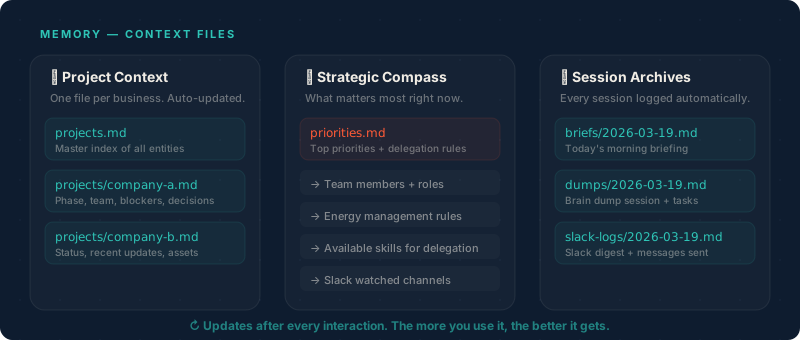
I have three types:
projects.mdis the master index of all businesses with their status and current focuspriorities.mdholds strategic priorities, delegation preferences, team members, and energy management rulesprojects/{entity}.mdis deep context per business: current phase, blockers, recent decisions, team
After every brain dump, every morning briefing, every Slack interaction, these files get updated automatically. So the next time I start a session, Claude already knows what happened yesterday. It knows the deploy went out, the pitch deck is due Friday, and I said I want to focus on revenue this quarter.
The more you use it, the better the coaching gets. That’s institutional memory compounding.
What This Means for You
You don’t need my exact setup. The tools I use (Motion, Slack, Reclaim) are my stack. Yours might be Todoist, Teams, and Google Calendar. The architecture stays the same. The integrations flex.
The real insight isn’t about any specific tool. It’s about the pattern:
- Define an identity so Claude coaches instead of just executing
- Write skills as markdown SOPs so complex workflows are repeatable
- Connect tools via API scripts so Claude can read and write to your systems
- Maintain context files so every session builds on the last one
If you’re a founder or operator trying to stay on top of a growing pile of responsibilities, this pattern gives you leverage that compounds. And if you’re wondering where to start with AI agents, this is actually a great entry point. The system reflects back your own patterns and starts suggesting what could be automated next.
Build Your Own
I put together a starter prompt that walks you through building your own version of this. You tell it what tools you use, how your business is structured, and it builds out the CLAUDE.md, the skills, and the context files, all customized to your workflow.
Grab the prompt in the Skool community. It’s free, and I’ll be doing more training on this system in there.